```{r}
#| label: setup
#| include: false
data("Oats", package = "nlme")
(Oats <- as.data.frame(Oats))
# Pre-generate QR code image for title slide
png("qr-title.png", width = 300, height = 300)
qrcode::qr_code("https://github.com/Gelsleichter/quarto_ws/") |> plot()
dev.off()
```
## About Me
::::: columns
::: {.column width="90%"}
**Yuri Gelsleichter**
- Postdoc Soil department — MATE, Gödöllő
- Background: Soil Science, Digital Soil Mapping, Pedometrics,
Spectroscopy
- Daily tools: R, Quarto, Linux, GDAL, QGIS, JavaScript, Positron (VS
Code-like)
- 📧 Gelsleichter.Yuri.Andrei\@uni-mate.hu
- 🔗 [github.com/Gelsleichter](https://github.com/Gelsleichter)
- 🔗 [research.uni-mate.hu/hu/w/dr.-gelsleichter-yuri](https://research.uni-mate.hu/hu/w/dr.-gelsleichter-yuri)
:::
::: {.column width="50%"}
:::
:::::
## Who Has Done This? 🙋
:::::: columns
::: {.column width="50%"}
1. Run analysis in R / Python / Excel / SPSS
2. Copy table → paste into Word
3. Copy figure → paste into Word
4. Adjust formatting, captions, numbering...
5. Co-author says: **"Let's transform the data"**
6. **Start over from step 1** 😩
:::
:::: {.column width="50%"}
::: fragment
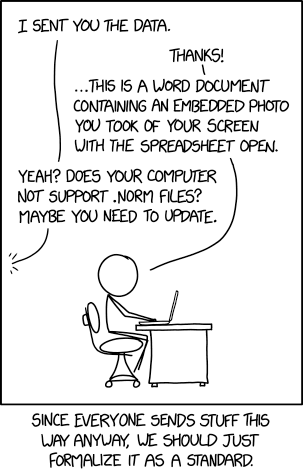{width="60%"
fig-alt="xkcd comic about file formats"}
:::
::::
::::::
## The Common Workflow
:::::: columns
::: {.column width="40%"}
```{mermaid}
%%| fig-cap: "The copy-paste cycle"
%%| echo: false
flowchart TB
A[🗂️ Raw Data] --> B[💻 Software
R / Python / Excel / SPSS]
B --> C[📊 Output
Tables & Figures]
C --> D[📋 Copy-Paste]
D --> E[📝 Word Document]
E --> F{Reviewer says:
'Let's change X'}
F --> B
```
:::
:::: {.column width="60%"}
::: fragment
**This diagram was code too!**
```` markdown
```{mermaid}
flowchart TB
A[Raw Data] --> B[Software]
B --> C[Output]
C --> D[Copy-Paste]
D --> E[Word Document]
E --> F{Reviewer says: 'Lets change X'}
F --> B
```
````
> Code → Output. That's the idea we're exploring today.
:::
::::
::::::
## After submit a paper:
"2000 years later..." 📬\
\
**Reviewer 2:**
> *"Please normalize variables before modeling."*
>
> *"Please add a Tukey post-hoc comparison."*
>
> *"Please remove the outlier in Block III and redo all analyses."*
. . .
You need to `redo` **every** table, **every** figure, **every** number in
the text...
. . .
And your project folder looks like this:
```
📁 project/
├── data_raw.xlsx
├── data_clean.xlsx
├── data_clean_v2.xlsx
├── data_FINAL.xlsx
├── data_FINAL_really.xlsx
└── data_FINAL_USE_THIS_reviewed_v3.xlsx 🤯
```
## The Invisible Problem
For click button software (Excel, SPSS...):
. . .
- Which **buttons** did you click? In which **order**?
- Which **menu options**? Which **checkboxes**?
- Can you **reproduce** this analysis in few months (weeks)?
- Can a **colleague** reproduce it without you?
. . .
::: callout-important
### Reproducibility is not just about code
It's about **recording decisions and methods** — in any software.
:::
## What If... {.center}
::: r-fit-text
Everything lived in **one file**?
:::
. . .
::: r-fit-text
Change the data → **everything updates**?
:::
. . .
> **Automatically :)**
## From Markup to Quarto
**Markup language** = text with formatting instructions
``` markdown
Markdown examples:
**bold text** → bold text
# Title → a heading
[link](url) → a clickable link
```
. . .
### The evolution
| Year | Tool | What changed |
|------|----------------|-----------------------------------------------------|
| 2004 | **Markdown** | Simple text formatting |
| 2012 | **R Markdown** | Markdown + R code chunks |
| 2022 | **Quarto** | Language-agnostic, multi-format, active development |
. . .
> You can still render `.Rmd` files with Quarto — nothing breaks.
## Markdown Cheat Sheet {.smaller}
:::: {.columns}
::: {.column width="50%"}
| You type | You get |
|----------|---------|
| `# Header 1` | Header level 1 |
| `## Header 2` | Header level 2 |
| `**bold**` | **bold** |
| `*italic*` | *italic* |
| `~~strike~~` | ~~strikethrough~~ |
| `[text](url)` | [clickable link](url) |
| `` | embedded image |
| `` `code` `` | `inline code` |
:::
::: {.column width="50%"}
| You type | You get |
|----------|---------|
| `- item` | bullet list |
| `1. item`| numbered list |
| `> text` | blockquote |
| `---` | horizontal rule |
| `^super^`| ^superscript^ |
| `~sub~` | ~subscript~ |
| `[^1]` | footnote reference |
:::
::::
> This cover the Markdown rules to compose a Quarto document.
## What is Quarto?
An **open-source scientific and technical publishing system**
::::: columns
::: {.column width="70%"}
- Created by [Posit](https://posit.co/) (formerly RStudio)
- The formula:
**Code** (data analysis) + **Text** (interpretation) + **Output** =
**One file**
- Supports **R**, **Python**, **Julia**, **Observable**
- Reference: [quarto.org](https://quarto.org/)
:::
::: {.column width="30%"}
{width="60%" fig-alt="Quarto logo"}
:::
:::::
## One File → Many Outputs
``` yaml
format:
html: default # web page
pdf: default # PDF document
docx: default # Word document
revealjs: default # slides (like this one!)
epub: default # e-book
```
. . .
Also: **websites**, **books**, **dashboards**, **manuscripts**...
Same content, different formats — from a single `.qmd` file.
## Where to Use Quarto
::::: columns
::: {.column width="60%"}
| IDE / Editor | Support |
|--------------|------------------|
| **RStudio** | Full (built-in) |
| **VS Code** | Full (extension) |
| **Positron** | Full (built-in) |
| **Jupyter** | Native |
| **Terminal** | CLI |
:::
::: {.column width="40%"}
{width="20%"
fig-alt="RStudio with Quarto document"}
{width="20%"
fig-alt="Positron with Quarto document"}
{width="20%"
fig-alt="VS Code with Quarto document"}
`.qmd` files are supported by the common code editor
:::
:::::
::: notes
Today we use RStudio, but Quarto works in any of these environments.
:::
## Real-World Examples
Explore the [Quarto Gallery](https://quarto.org/docs/gallery/):
::::: columns
::: {.column width="50%"}
- 📄 [Journal
articles](https://quarto.org/docs/gallery/#articles-reports)
- 📊 [Dashboards](https://quarto.org/docs/gallery/#dashboards)
- 📚 [Books](https://quarto.org/docs/gallery/#books)
:::
::: {.column width="50%"}
- 🌐 [Websites](https://quarto.org/docs/gallery/#websites)
- 🎤 [Presentations](https://quarto.org/docs/gallery/#presentations)
- 📝 [Interactive
docs](https://quarto.org/docs/gallery/#interactive-docs)
:::
:::::
. . .
::: callout-tip
### This presentation is also a `.qmd` file!
Rendered with `format: revealjs` — the same system we'll learn today.
:::
## Let's See How It Works {.center}
::: r-fit-text
Building a Quarto file, **step by step**
:::
# Part 3: Anatomy of a `.qmd` File {background-color="#2C3E50"}
## What We'll Build
We'll construct a complete reproducible document using the **Oats
dataset**:
::::: columns
::: {.column width="60%"}
**The data:**
- Split-plot Experiment on Varieties of Oats
- 3 varieties: Golden Rain, Marvellous, Victory
- 4 nitrogen levels: 0, 0.2, 0.4, 0.6 cwt/acre
- 6 blocks, 72 observations
**The analysis:**
- Summary tables, figures, inline results
- A simple linear model
cwt: "hundredweight" (centweight), 1 cwt = 112 lbs ~50.8 kg
Yield: 1/4 lbs per sub-plot (1/80 acre)
Original units from Yates (1935)
:::
::: {.column width="40%"}
```{r}
#| label: preview-data
#| echo: false
#| fig-width: 6
#| fig-height: 4
library(ggplot2)
ggplot2::ggplot(Oats, ggplot2::aes(x = nitro, y = yield, color = Variety)) +
ggplot2::geom_point(size = 2, alpha = 0.6) +
ggplot2::geom_smooth(method = "lm", se = FALSE, linewidth = 0.8) +
ggplot2::labs(x = "Nitrogen (cwt/acre)", y = "Yield (bu/acre)") +
ggplot2::theme_minimal(base_size = 14) +
ggplot2::theme(legend.position = "top")
```
:::
:::::
## Step 1: The YAML Header
Every `.qmd` file starts with a **YAML header** between `---` marks:
``` yaml
---
title: "Oat Yield Analysis"
author: "Your Name"
date: today
format: html
---
```
. . .
- `title`, `author`, `date` → document metadata
- `format: html` → output type
- **The header controls everything about your document**
. . .
Change `format: html` to `format: docx` → the **entire output** changes
to Word!
YAML (Yet Another Markup Language), is a human-friendly way to specify options and metadata
## YAML Options
``` yaml
---
title: "Oat Yield Analysis"
author: "Your Name"
format:
docx: default
pdf: default
html:
toc: true # table of contents
code-fold: show # collapsible code blocks
embed-resources: true # self-contained HTML file
(many more)
---
```
. . .
::: callout-tip
### `embed-resources: true`
Produces a **single, self-contained HTML file** — all images, CSS, and
JS bundled inside. Share via email, USB, or upload anywhere. No broken
links!
:::
**The YAML header is the "brain" of your document** — it controls the overall structure, format, and behavior.
. . .
> More options in the [Quarto formats](https://quarto.org/docs/reference/formats/html.html) and [execution-options](https://quarto.org/docs/computations/execution-options.html).
## Step 2: Text in Markdown
::::: columns
::: {.column width="50%"}
### You write:
``` markdown
## Introduction
This study examines the effect
of **nitrogen** on *oat yield*.
Key findings:
- Nitrogen increases yield
- Varieties respond similarly
- [Oats dataset, F. Yates, 1935](https://doi.org/10.2307/2983638)
```
:::
::: {.column width="50%"}
### You get:
Introduction
This study examines the effect of **nitrogen** on *oat yield*.
Key findings:
- Nitrogen increases yield
- Varieties respond similarly
- [Oats dataset, F. Yates, 1935](https://repository.rothamsted.ac.uk/id/eprint/23645/1/jrsssb_2_2_181.pdf)
:::
:::::
## Callout Blocks
::: callout-note
### Note
Useful for supplementary information.
:::
::: callout-tip
### Tip
Share best practices and shortcuts.
:::
::: callout-warning
### Warning
Highlight potential issues or assumptions.
:::
::: callout-important
### Important
Critical information — don't skip this!
:::
## Step 3: Code Chunks
**Code lives inside the document** — it runs when you render.
You write:
````{markdown}
```{r}
data(Oats)
Oats <- as.data.frame(Oats)
head(Oats)
```
````
. . .
You get:
```{r}
#| echo: true
data("Oats")
Oats <- as.data.frame(Oats)
head(Oats)
```
## Chunk Options: What Each One Does {.smaller}
| Option | What it controls | Default |
|-----------|-------------------------------------------------------|---------|
| `echo` | Show the **code** in the output? | `true` |
| `eval` | **Run** the code? | `true` |
| `include` | Include **anything** (code + output) in the document? | `true` |
| `output` | Show the **results**? | `true` |
. . .
**By default, everything is shown and everything runs.** You turn
options *off* to control what the reader sees.
. . .
Set per chunk with `#|` comments:
``` r
#| echo: false
#| eval: true
```
Or globally in the YAML `execute:` block for the entire document.
## Chunk Options: Common Combinations {.smaller}
| You want... | Set this | Code | Runs | Output |
|-----------------------------|---------------------|------|------|--------|
| Show everything *(default)* | *(nothing)* | ✅ | ✅ | ✅ |
| Hide code, show results | `#| echo: false` | ❌ | ✅ | ✅ |
| Show code, don't run it | `#| eval: false` | ✅ | ❌ | ❌ |
| Run silently (setup) | `#| include: false` | ❌ | ✅ | ❌ |
For example: `echo: true` (default)
The reader sees **both** the code and the output:
````{markdown}
```{r}
#| echo: true
mean(Oats$yield)
```
````
. . .
```{r}
#| echo: true
mean(Oats$yield)
```
. . .
Example: `echo: false`
The reader sees **only the output** — the code is hidden:
````{markdown}
```{r}
#| echo: false
mean(Oats$yield)
```
````
. . .
```{r}
#| echo: false
mean(Oats$yield)
```
## Example: `eval: false`
The reader sees **only the code** — it doesn't run:
```{r}
#| label: demo-eval-false
#| eval: false
# This code is displayed but NOT executed
very_slow_model <- train_model(data, epochs = 10000)
```
> Useful for showing examples or syntax without running them.
## Example: `code-fold` (click to toggle)
When you set `code-fold: true`, the reader sees a **button** to expand:
```{r}
#| label: demo-code-fold
#| code-fold: true
#| code-summary: "Click to see the code"
aggregate(yield ~ Variety, data = Oats, FUN = mean)
```
> Focus on results, but code still there. **Same document.**
## Step 4: Tables with `knitr::kable`
```{r}
#| label: tbl-summary
#| tbl-cap: "Mean oat yield by variety"
aggregate(yield ~ Variety, data = Oats, FUN = mean) |>
knitr::kable(digits = 1, col.names = c("Variety", "Mean Yield"))
```
. . .
**Cross-reference:** As shown in @tbl-summary, *Marvellous* has the
highest mean yield.
. . .
> "The table *number* **updates itself** if modified."
## Tables with `{gt}` ✨ {.smaller}
Same data, **publication-ready** in a few extra lines:
```{r}
#| label: tbl-gt
#| tbl-cap: "Mean oat yield by variety and nitrogen level"
Oats |>
dplyr::group_by(Variety, nitro) |>
dplyr::summarise(mean_yield = round(mean(yield), 1), .groups = "drop") |>
tidyr::pivot_wider(names_from = nitro, values_from = mean_yield,
names_prefix = "N = ") |>
gt::gt() |>
gt::tab_header(
title = "Oat Yield by Variety and Nitrogen",
subtitle = "Mean yield (bushels/acre)"
)
```
## Step 5: Figures + Cross-References
```{r}
#| label: fig-yield
#| fig-cap: "Oat yield by nitrogen application rate"
#| fig-width: 12
#| fig-height: 5
#| output-location: column-fragment
ggplot2::ggplot(Oats, ggplot2::aes(x = factor(nitro), y = yield)) +
ggplot2::geom_boxplot(alpha = 0.5) +
ggplot2::geom_jitter(ggplot2::aes(color = Variety), width = 0.1, size = 2) +
ggplot2::labs(x = "Nitrogen", y = "Yield") +
ggplot2::theme_minimal(base_size = 16)
```
## Cross-References
Reference figures and tables by their label:
```markdown
As shown in @fig-yield, nitrogen increases yield.
Model coefficients are in @tbl-model.
```
. . .
**Rendered:**
\
As shown in @fig-yield, nitrogen increases yield.
\
Model coefficients are in @tbl-gt
. . .
::: callout-important
### Labels must start with a prefix
`fig-` for figures, `tbl-` for tables, `eq-` for equations, `sec-` for
sections.
:::
## Step 6: Inline Code (blend in the text)
::::: columns
::: {.column width="50%"}
### You write:
``` markdown
The dataset contains
**`r nrow(Oats)`** observations.
The mean yield was
**`r round(mean(Oats$yield), 1)`**
bushels/acre.
Yield ranged from
`r min(Oats$yield)` to
`r max(Oats$yield)`.
```
:::
::: {.column width="50%"}
### You get:
The dataset contains **`r nrow(Oats)`** observations.
The mean yield was **`r round(mean(Oats$yield), 1)`** bushels/acre.
Yield ranged from `r min(Oats$yield)` to `r max(Oats$yield)`.
:::
:::::
. . .
> **The numbers come directly from the data.** Change the data, the text
> updates.
## Step 7: Second Figure
```{r}
#| label: fig-regression
#| fig-cap: "Nitrogen-yield response by oat variety"
#| fig-width: 12
#| fig-height: 5
#| output-location: column-fragment
ggplot2::ggplot(Oats, ggplot2::aes(x = nitro, y = yield, color = Variety)) +
ggplot2::geom_point(size = 2.5, alpha = 0.6) +
ggplot2::geom_smooth(method = "lm", se = TRUE, alpha = 0.2) +
ggplot2::labs(x = "Nitrogen (cwt/acre)", y = "Yield (bu/acre)") +
ggplot2::theme_minimal(base_size = 16) +
ggplot2::theme(legend.position = "top")
```
Now we have @fig-yield (Figure 1) and @fig-regression (Figure 2). **Add
or remove figures — numbering is always correct.**
## Step 8: Fitting a Model
```{r}
#| label: fit-model
model <- lm(yield ~ nitro + Variety, data = Oats)
summary(model)
```
> The results flow into the document.
## Tidy Model Table with `{broom}` + `{gt}` ✨
```{r}
#| label: tbl-model
#| tbl-cap: "Linear model coefficients"
broom::tidy(model, conf.int = TRUE) |>
dplyr::mutate(dplyr::across(dplyr::where(is.numeric), \(x) round(x, 3))) |>
gt::gt() |>
gt::tab_header(
title = "Linear Model: Yield ~ Nitrogen + Variety",
subtitle = "Oat yield experiment"
)
```
**From raw output to publication table — no manual formatting.** See
@tbl-model.
## Model Equation with `{equatiomatic}` ✨ {.smaller}
Extract the **symbolic equation** directly from the model:
```{r}
#| label: eq-symbolic
#| results: asis
equatiomatic::extract_eq(model, wrap = TRUE)
```
. . .
Now with **estimated coefficients**:
```{r}
#| label: eq-coefs
#| results: asis
equatiomatic::extract_eq(model, use_coefs = TRUE, wrap = TRUE)
```
. . .
> The equation writes itself from the model object. **Change the model,
> the equation updates.**
## Auto-Generated Report with `{report}` ✨
```{r}
#| label: report-model
report::report(model)
```
. . .
> The package `report` is handy, and works with several model outputs.
>
> It generates a **narrative summary** of the model results.
## Step 9: One File → Many Formats
```{mermaid}
%%| fig-cap: "One .qmd, many outputs"
flowchart LR
A[📄 .qmd file] --> B[🌐 HTML]
A --> C[📑 PDF]
A --> D[📝 Word]
A --> E[🎤 Slides]
A --> F[📚 ePub]
```
. . .
When you render to HTML with multiple formats, Quarto **automatically**
adds download links for PDF, Word, and ePub — readers can choose!
```{r}
#| label: setup-python
#| echo: true
# install.packages("reticulate")
library(reticulate)
# reticulate::install_miniconda()
reticulate::py_config()
reticulate::py_require("pandas")
reticulate::py_require("matplotlib")
# Sys.setenv(RETICULATE_PYTHON = "~/miniforge3/bin/python3.12")
# reticulate::use_python("/home/ds/miniforge3/bin/python3.12")
# reticulate::py_install("pandas", pip = TRUE)
# reticulate::py_install("matplotlib", pip = TRUE)
```
## Tabsets (Tabs)
::: panel-tabset
### Base R
```{r}
#| eval: true
boxplot(yield ~ nitro, data = Oats)
```
### ggplot2
```{r}
#| eval: true
ggplot2::ggplot(Oats, ggplot2::aes(x = factor(nitro), y = yield)) +
ggplot2::geom_boxplot() +
ggplot2::theme_minimal()
```
### Python
```{python}
#| eval: true
import pandas as pd
import matplotlib.pyplot as plt
df = r.Oats
df.boxplot(column='yield', by='nitro')
plt.show()
```
:::
> Same analysis, three languages, one document.
## Python Integration
Quarto supports Python **natively**. From RStudio, we use
`{reticulate}`:
```{r}
#| label: python-setup
#| include: false
library(reticulate)
reticulate::py_require("pandas")
oats_py <- Oats
```
. . .
```{python}
#| label: python-demo1
import pandas as pd
df = r.oats_py
print(f"Dataset: {df.shape[0]} rows × {df.shape[1]} columns")
```
. . .
```{python}
#| label: python-demo2
import pandas as pd
print(df.groupby('Variety')['yield'].mean().round(1))
```
. . .
> Same document, same workflow — R and Python side by side.
## YAML Tricks
::::: columns
::: {.column width="50%"}
### Dark / Light toggle
``` yaml
theme:
dark: darkly
light: cosmo
```
Readers switch between themes — built-in!
### Self-contained HTML
``` yaml
embed-resources: true
```
A single HTML file with everything inside. The *"portable PDF"* of the
HTML world.
:::
::: {.column width="50%"}
### Collapsible code
``` yaml
code-fold: show
code-tools: true
```
Readers toggle code visibility with a click.
### Table of contents
``` yaml
toc: true
toc-depth: 3
toc-location: left
```
Automatic, clickable navigation.
:::
:::::
## Facts to consider before use Quarto
- **Heavy pipelines** → separate computation (`.R`) from reporting
(`.qmd`). Load saved results with `readRDS()`.
. . .
- **Large projects** → split into a Quarto Project with multiple `.qmd`
files (books, websites).
. . .
- **Real-time collaboration** → render to `.docx`, share with
co-authors, incorporate feedback — or use version control (Git).
. . .
::: callout-tip
These aren't reasons to **avoid** Quarto — they're strategies for
**using it well**.
:::
## Let's Build One From Scratch {.center}
::: r-fit-text
Open RStudio → File → New File → Quarto Document
:::
**If you have RStudio (Quarto is built in)** — follow along!
**If not** — All materials in the `link/QR code`.
```{r}
#| label: qr-handson
#| echo: false
#| fig-width: 3
#| fig-height: 3
#| fig-align: center
qrcode::qr_code("https://github.com/Gelsleichter/quarto_ws/") |> plot()
```
`github.com/Gelsleichter/quarto_ws`
## What We Covered
- ✅ Why reproducibility matters
- ✅ Anatomy of a `.qmd` file (YAML + Markdown + Code)
- ✅ Tables (`kable`, `gt`), figures (`ggplot2`), inline code
- ✅ Cross-references (`@fig-`, `@tbl-`)
- ✅ Model output: equations (`equatiomatic`), tidy tables (`broom`),
auto-reports (`report`)
- ✅ Python integration (`reticulate`)
- ✅ One file → many formats (HTML, Word, PDF, Slides)
## Keyboard Shortcuts (RStudio)
| Shortcut | Action |
|------------------------|-------------------|
| `Ctrl + Shift + K` | Render document |
| `Ctrl + Alt + I` | Insert code chunk |
| `Ctrl + Shift + Enter` | Run current chunk |
| `Ctrl + Enter` | Run current line |
| `Ctrl + Shift + M` | Insert pipe `|>` |
## Resources & References {.smaller}
### Official
- [Quarto Documentation](https://quarto.org/) · [Quarto
Gallery](https://quarto.org/docs/gallery/) · [Revealjs
Guide](https://quarto.org/docs/presentations/revealjs/)
### Workshops & Tutorials
- Çetinkaya-Rundel & Bray — [*"From R Markdown to Quarto"*](https://mine.quarto.pub/quarto-asa-nebraska/)
- Wickham — [*"Intro to Quarto"*](https://charlotte.quarto.pub/cascadia/) · Jadey Ryan — [*"Reproducible Reports"*](https://jadeyryan.quarto.pub/slc-rug-quarto/)
- NBIS Sweden — [*"Reproducible Research"*](https://nbisweden.github.io/workshop-reproducible-research/pages/quarto.html)
- Schoch — [*"Automated Reports with Quarto"*](https://gesiscss.github.io/quarto-workshop/material/slides/05_presentations.html)
- [Carpentries Incubator](https://github.com/carpentries-incubator/reproducible-publications-quarto) · [Awesome Quarto](https://github.com/mcanouil/awesome-quarto) · [R4DS (2e)](https://r4ds.hadley.nz/quarto-formats)
### R Packages Used Today
`ggplot2` · `gt` · `equatiomatic` · `broom` · `report` · `knitr` ·
`reticulate` · `qrcode` · `dplyr` · `tidyr`
## Thank You! {.center}
### Questions?
📧 Gelsleichter.Yuri.Andrei\@uni-mate.hu
🔗 [github.com/Gelsleichter](https://github.com/Gelsleichter)
```{r}
#| label: qr-final
#| echo: false
#| fig-width: 3
#| fig-height: 3
#| fig-align: center
qrcode::qr_code("https://github.com/Gelsleichter/quarto_ws/") |> plot()
```
`github.com/Gelsleichter/quarto_ws`